Claude Mythos Breach Warning for Business AI Adoption
AI is moving faster than most businesses can safely govern it. The recent reports involving Anthropic’s Claude Mythos model should be a warning to every organization experimenting with large language models, AI agents, browser automation, and outside AI consultants.
Bottom line: The Claude Mythos incident is concerning because powerful AI is beginning to compress Cybersecurity expertise. A tool that can help find and exploit vulnerabilities can be valuable for defenders, but dangerous when access, data, permissions, and agentic AI workflows are not governed.
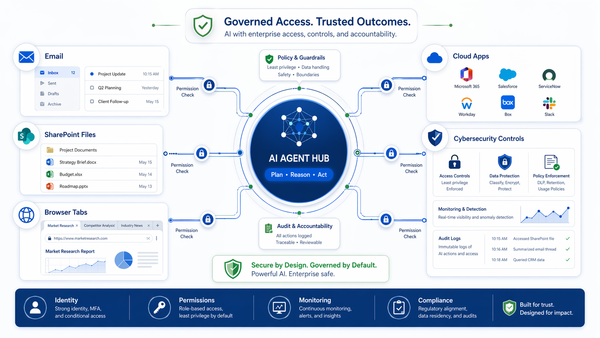
The Claude Mythos Breach Warning
The recent reports involving Anthropic’s Claude Mythos model are not just another piece of AI industry news. They point to a much larger cybersecurity issue that businesses need to understand now.
Public reporting indicates that Anthropic investigated unauthorized access to Claude Mythos Preview through a third-party vendor environment. This is important because Mythos was reportedly not a normal consumer chatbot. It was a highly restricted model with advanced cybersecurity capabilities.
To be clear, this should not be described as a confirmed customer-data breach unless future reporting proves that customer data was exposed. The more accurate concern is that unauthorized users reportedly gained access to a powerful, restricted AI system through a vendor-controlled environment.
That distinction matters, but it should not make business leaders less concerned. In some ways, the larger issue is more serious: cybersecurity is entering a phase where highly capable AI models can help discover, understand, and potentially exploit weaknesses in software, systems, and networks at a speed that many organizations are not prepared to defend against.
Source note: Public reporting has described the Mythos issue as a reported unauthorized-access incident involving a third-party vendor environment, not as a confirmed customer-data breach. See The Guardian’s report on Anthropic’s Claude Mythos investigation.
Why Claude Mythos Is Different From a Normal Chatbot
The basic reason this story matters is that Claude Mythos has been described as a frontier AI model with advanced cyber capabilities. In plain English, that means it may be able to reason through cybersecurity problems, identify vulnerable software, analyze attack paths, and help perform multi-step technical tasks that previously required significant human expertise.
According to the UK AI Security Institute, Claude Mythos Preview showed significant improvement in capture-the-flag cybersecurity challenges and multi-step cyber-attack simulations. Public reporting also stated that Mythos completed a 32-step corporate network attack simulation in controlled testing in 3 out of 10 attempts.
That does not mean Mythos magically creates vulnerabilities. It does not need to. The vulnerabilities already exist in the real world: poorly configured systems, weak passwords, exposed services, outdated software, insecure APIs, overshared data, stale accounts, weak identity controls, and unmanaged integrations.
The danger is that AI can make those weaknesses easier to find, easier to understand, and easier to exploit.
Business takeaway: AI does not need to invent a new cyberattack to be dangerous. It only needs to make existing attacks faster, easier, cheaper, and more accessible.
Source note: The UK AI Security Institute reported that Claude Mythos Preview showed continued improvement in cybersecurity capture-the-flag challenges and significant improvement on multi-step cyber-attack simulations. See the UK AI Security Institute’s evaluation of Claude Mythos Preview’s cyber capabilities.
AI Lowers the Skill Barrier for Cyberattacks
For years, sophisticated cyberattacks required a combination of technical skill, time, persistence, and specialized knowledge. Attackers needed to understand reconnaissance, vulnerability research, authentication weaknesses, privilege escalation, lateral movement, data theft, evasion, and cleanup.
AI changes that equation.
Powerful AI systems can explain vulnerabilities, generate code, analyze error messages, summarize technical documentation, interpret logs, suggest attack paths, and help chain multiple steps together. In the hands of defenders, that can improve cybersecurity. In the hands of attackers, careless users, insiders, or unvetted consultants, it can dramatically increase risk.
This is why the Claude Mythos situation matters to small and mid-sized businesses. The concern is not only that a restricted model was reportedly accessed without authorization. The concern is what this represents: a future where increasingly capable AI systems can help people discover and exploit weak environments with far less expertise than was previously required.
That future is not theoretical. Businesses are already connecting AI tools to email, files, browsers, cloud applications, internal documentation, code, customer records, and financial systems. Once AI becomes an active participant inside the business environment, the risk is no longer limited to what an employee types into a chatbot.
AI Agents Are Not Just Chatbots
Many business owners still think of AI as a smarter search box or a more advanced writing assistant. That may have been true when employees were simply typing questions into a web-based chatbot. It is no longer true when AI tools can connect to email, calendars, browsers, local files, cloud storage, SaaS applications, code repositories, accounting platforms, CRM systems, and Microsoft 365 data.
An AI agent connected to business systems is not just answering questions. It may be reading documents, summarizing email threads, opening web pages, creating files, interpreting attachments, calling APIs, triggering workflows, or interacting with software on behalf of the user.
That changes the risk profile completely.
A chatbot is a productivity tool. An AI agent with access to business data is a new workflow layer, a new integration layer, and potentially a new data-exfiltration path. If it is deployed without governance, it can bypass years of investment in Microsoft 365 security, SharePoint permissions, endpoint protection, compliance policies, and data-loss prevention.
How a Poorly Built AI Agent Can Become an Internal Attack Surface
The same concern raised by cyber-capable AI models applies inside a business network. If an AI model can help find weaknesses in software and systems, then an improperly deployed AI agent can also become a powerful tool for discovering weaknesses inside the business environment where it is connected.
Consider an AI agent that has access to email, browser sessions, SharePoint, OnEDRive, Teams, SaaS applications, local files, or internal documentation. If that agent is poorly governed, over-permissioned, connected through unmanaged plug-ins, or deployed in a consultant-controlled environment, it may have visibility into exactly the types of information an attacker would want:
- Internal system names and network details
- Vendor portals and administrative URLs
- Shared credentials or password-reset information
- Customer data and confidential documents
- Financial records, invoices, and payment instructions
- Security policies and cyber insurance documents
- Employee lists, roles, and approval workflows
- Legacy systems, unsupported software, and exposed integrations
That information may be scattered across email, documents, spreadsheets, browser tabs, chat messages, and cloud storage. A human attacker would need time to collect and understand it. A connected AI agent may be able to summarize it quickly.
This is why Delaney Computer Services is cautious about AI desktop tools, browser agents, unmanaged Claude deployments, unapproved plug-ins, and consultant-built AI workflows that live outside the client’s controlled environment. The danger is not only what the tool is supposed to do. The danger is what it can access, what it can infer, and what it may be manipulated into doing.
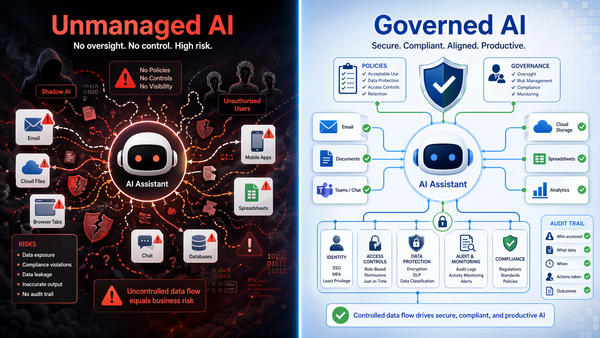
What a Risky AI Implementation Looks Like
A properly governed AI deployment should respect identity, access controls, permissions, logging, retention, compliance rules, and data-protection policies. A poorly built AI deployment may do the opposite.
For example, a risky AI implementation may:
- Use a consultant’s cloud environment instead of the client’s controlled tenant.
- Connect to business email without proper scoping or logging.
- Read SharePoint or OneDrive content that was never cleaned up or permissioned correctly.
- Access browser sessions where users are already logged in.
- Use API keys, tokens, or service accounts without least-privilege controls.
- Store prompts, files, outputs, or logs in systems the client does not control.
- Connect to third-party tools without vendor-risk review.
- Operate without audit trails, retention rules, or data-loss prevention.
In that scenario, the AI agent itself becomes part of the attack surface. It may not be malicious, but it can create a new path for data exposure, prompt injection, unauthorized access, accidental disclosure, or loss of control.
This is especially concerning as AI models become more capable at reasoning through technical environments. An AI system that can analyze software vulnerabilities may also be very good at analyzing a messy business environment with weak permissions, stale accounts, overshared files, exposed tokens, and poorly documented systems.
The Bigger Business Risk: Shadow AI
The real danger for most businesses is not one specific AI vendor. The larger problem is Shadow AI.
Shadow AI occurs when employees, executives, departments, or outside consultants use artificial intelligence tools without IT, security, compliance, or management oversight. It often starts innocently. Someone uploads a spreadsheet to summarize it. A salesperson pastes customer notes into a chatbot. A manager connects an AI tool to email. An executive authorizes an outside consultant to build an automation. A department starts using an AI browser agent because it looks impressive in a demo.
Then, suddenly, sensitive business data is moving through tools the company has not approved, cannot audit, cannot govern, and may not even know exist.
That is not innovation. That is unmanaged risk.
Why “Move Fast” Can Be Dangerous With AI
Many small business owners are hearing the same message from the AI marketplace: move fast, automate everything, remove friction, and do not let traditional IT slow you down.
That message is incomplete and dangerous.
When your IT provider or managed service provider slows down an AI deployment, it is not always because they are resisting progress. Sometimes they are asking the basic questions that must be answered before business data is connected to a powerful third-party system:
- What business data will the AI tool be able to access?
- Will it connect to Microsoft 365, SharePoint, OneDrive, Teams, Outlook, browsers, local files, or SaaS platforms?
- Where will prompts, responses, uploaded files, and logs be stored?
- Can company data be used to train models?
- Can the tool act on behalf of a user?
- Can administrators audit usage?
- Can access be revoked quickly?
- Does it respect existing permissions and sensitivity labels?
- Does it create new exposure through plug-ins, extensions, browser sessions, APIs, or desktop access?
- Who is responsible if the tool leaks, deletes, misroutes, or misuses data?
Those questions are not red tape. They are the beginning of AI governance.
The Problem With Unvetted AI Consultants
The AI consulting market is still immature. Many people selling AI automation services are skilled at prompts, demos, and workflow prototypes. That does not automatically mean they understand cybersecurity, Microsoft 365 administration, SharePoint permissions, Entra ID, data retention, vendor risk, compliance, endpoint protection, incident response, or Business Continuity.
This matters because an AI consultant can build something that appears impressive in a demo while creating serious long-term risk for the business.
For example, a consultant may propose using their own development environment, their own cloud tenant, their own API keys, their own file storage, or their own automation platform. That may be convenient for the consultant, but it can be completely inappropriate for the client.
When business AI is being built for a company, the company must retain control. The application, data, identity controls, logging, permissions, and administrative ownership should live inside approved business systems whenever possible. For many organizations already standardized on Microsoft 365, that often means building around Microsoft 365, Azure, Entra ID, SharePoint, Teams, and approved enterprise AI services rather than scattering sensitive workflows across unmanaged third-party platforms.
Why DCS Often Recommends Microsoft 365 Copilot First
Delaney Computer Services does not believe every business should blindly deploy every AI tool that appears on the market. We also do not believe AI should be blocked entirely. The right approach is governed adoption.
For organizations already built around Microsoft 365, Microsoft 365 Copilot and related managed AI services are often a more practical starting point because they operate within an existing enterprise security framework.
Microsoft states that Microsoft 365 Copilot uses Microsoft Graph data, such as documents, emails, meetings, chats, and contacts, based on the permissions the user already has. Microsoft also states that prompts, responses, and data accessed through Microsoft Graph are not used to train foundation large language models. In addition, Microsoft 365 Copilot is designed to work with existing Microsoft 365 privacy, security, compliance, retention, eDiscovery, auditing, and data-protection controls.
That does not mean Copilot is risk-free. No AI platform is risk-free. In fact, Copilot can expose poor SharePoint permissions, weak data governance, and overshared documents if those issues already exist in the tenant.
But that is exactly the point: Copilot gives your IT provider a more governable starting point. It allows AI adoption to happen inside a familiar identity, compliance, and administrative model rather than through unsanctioned desktop tools, browser extensions, consumer AI accounts, or consultant-controlled environments.
Source note: Microsoft’s documentation states that Microsoft 365 Copilot is covered by Microsoft 365 commercial privacy, security, and compliance commitments and that prompts, responses, and Microsoft Graph data are not used to train foundation LLMs. See Microsoft’s Data, Privacy, and Security for Microsoft 365 Copilot.
Prompt Injection Is a Real AI Security Problem
One of the most important AI risks for business leaders to understand is prompt injection.
Prompt injection occurs when malicious or hidden instructions manipulate an AI system into doing something unintended. This is especially dangerous when AI agents read untrusted content from web pages, emails, documents, chats, tickets, forms, calendar invitations, or shared files.
Anthropic’s own research describes a browser-agent scenario where hidden instructions inside an email could direct an AI agent to forward confidential messages to an external address. OWASP also identifies prompt injection as a major LLM application risk because attackers can manipulate model behavior through natural language instructions rather than traditional code-based exploits.
This is a major reason AI tools need governance before they are connected to business systems. The risk is not only what the user tells the AI to do. The risk is also what a malicious web page, email, document, calendar invite, comment, or file can trick the AI into doing.
Source note: See Anthropic’s research on prompt-injection defenses for browser use and the OWASP LLM Prompt Injection Prevention Cheat Sheet.
Claude Desktop, Browser Agents, and Local Access Raise Serious Questions
Tools such as Claude Desktop and other AI desktop or browser-based agents may be attractive because they promise convenience. They may be able to interact with browsers, files, email, cloud services, local applications, and automation workflows. That capability is exactly what makes them risky in a business environment.
Before any AI desktop agent or browser agent is deployed, businesses should ask:
- Can the AI read local files?
- Can it interact with browser sessions where users are already logged in?
- Can it access Outlook, Gmail, Microsoft 365, SharePoint, OneDrive, Teams, SLAck, CRM, accounting, or other business systems?
- Can it install or call external tools?
- Can it connect to Model Context Protocol servers, APIs, browser extensions, or third-party plug-ins?
- Can the business log and review what it did?
- Can IT restrict what data it sees and what actions it can take?
- Can the business prove where confidential data went?
If the answer is unclear, the deployment should not proceed until the risks are reviewed.
The Claude Code Source Exposure Is Another Reminder
Claude Mythos is not the only recent Claude-related issue that should get the attention of business and IT leaders. Anthropic also confirmed that internal Claude Code source material was inadvertently included in an npm package because of a packaging issue. Anthropic stated that no sensitive customer data or credentials were exposed and described the matter as a release packaging issue rather than a security breach.
That is an important distinction. Still, the lesson for businesses is the same: even sophisticated AI companies can experience access-control issues, vendor-environment exposure, packaging mistakes, and rapidly evolving security concerns.
Vendor trust is not a substitute for tenant-level controls, monitoring, contractual protections, identity governance, and deployment review.
Source note: Anthropic characterized the Claude Code issue as a packaging error and stated that no sensitive customer data or credentials were exposed. See The Hacker News coverage of the Claude Code source exposure.
AI Governance Is Now a Basic Business Requirement
Every business using AI should have an AI governance process. This does not need to be bureaucratic, but it does need to exist.
At a minimum, businesses should:
- Create an inventory of AI tools currently in use.
- Decide which AI tools are approved, blocked, or under review.
- Require IT review before connecting AI tools to business data.
- Review Microsoft 365, SharePoint, OneDrive, and Teams permissions before enabling AI at scale.
- Confirm whether prompts, responses, and uploaded files are retained or used for training.
- Require MFA, conditional access, endpoint protection, and logging.
- Use sensitivity labels, data-loss prevention, and retention policies where appropriate.
- Block unsanctioned browser extensions, plug-ins, desktop agents, and AI connectors where needed.
- Require vendor and consultant review before any AI project begins.
- Start with pilot groups before company-wide deployment.
This is especially important for regulated businesses, professional services firms, healthcare-related organizations, financial firms, legal practices, manufacturers, construction companies, nonprofits, and any company that handles confidential client, employee, financial, operational, or intellectual property data.
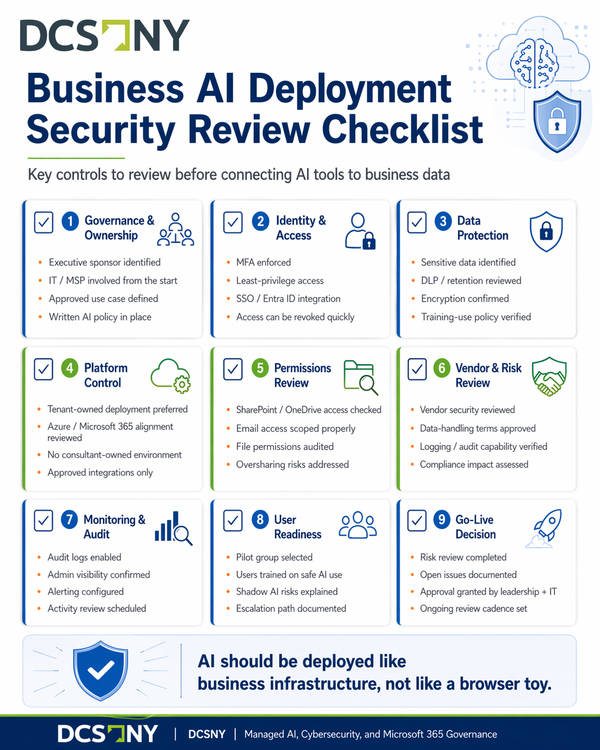
AI Should Be Deployed Like Infrastructure, Not Like a Toy
AI can be a major competitive advantage. It can help employees summarize information, draft content, analyze documents, improve service delivery, automate repetitive tasks, and make better use of business data.
But AI should be deployed like business infrastructure, not like a browser toy.
That means the deployment needs ownership, controls, documentation, monitoring, security review, acceptable-use rules, and a clear understanding of where data goes. The faster AI becomes embedded into daily work, the more important these controls become.
When business leaders bypass IT and work directly with unvetted AI consultants, they may believe they are removing friction. In reality, they may be removing the very controls that protect the business.
When your MSP slows down an AI deployment, it is not always resistance. Sometimes it is risk management.
How DCS Helps Businesses Adopt AI Safely
Delaney Computer Services helps businesses evaluate, secure, and deploy AI tools in a way that aligns with their existing technology environment. For many clients, that means starting with Microsoft 365, SharePoint, OneDrive, Teams, Entra ID, Azure, Purview, and approved enterprise AI platforms rather than allowing disconnected AI tools to spread across the organization.
Our Managed AI services are designed to help businesses use AI productively while reducing unnecessary exposure. We help review the platform, permissions, data access, vendor terms, compliance concerns, identity controls, endpoint impact, and cybersecurity implications before AI becomes part of daily operations.
We also help businesses strengthen the cybersecurity foundation required for safe AI adoption, including managed cybersecurity services, Microsoft 365 security hardening, SharePoint governance, endpoint protection, identity security, SaaS monitoring, and employee guidance.
Before You Connect AI to Your Business Data, Talk to DCS
The recent Claude-related reports are not a reason to panic. They are a reason to slow down and govern AI properly.
Before connecting any AI tool to your email, SharePoint, OneDrive, Teams, browser, accounting platform, CRM, file system, or customer data, speak with DCS. We can help determine whether the tool belongs in your environment, whether it should be blocked, whether Microsoft 365 Copilot is a safer starting point, and what controls need to be in place before deployment.
AI adoption is not just a productivity decision. It is a cybersecurity, compliance, and business-risk decision.
Contact DCS Before Deploying AI Across Your Business
Related DCS Resources
- Managed AI Services
- Shadow AI Glossary Definition
- Managed Cybersecurity Services
- Managed IT Services
- Microsoft 365 AI, Copilot, Claude, and Agent 365
- Small Business AI Security Platform Choice
- Workplace AI Liability Risk
Source material and further reading:
- The Guardian: Anthropic investigates report of rogue access to hack-enabling Mythos AI
- UK AI Security Institute: Evaluation of Claude Mythos Preview’s cyber capabilities
- The Hacker News: Claude Code source leaked via npm packaging error
- Anthropic: Mitigating the risk of prompt injections in browser use
- OWASP: LLM Prompt Injection Prevention Cheat Sheet
- Microsoft Learn: Data, privacy, and security for Microsoft 365 Copilot